|
A 3D printer
shouldn’t be limited to building simple cubes and spheres.
It’s supposed to let your creativity flourish—however
sophisticated or wild your designs may be. With Dreamer,
anything you imagine can become a physical reality that you
can touch, hold, and feel. The Dreamer's Dual Printheads are
fine-tuned to build in Two Materials or Colors
simultaneously. So your design stands out in places where
it’s supposed to shine. Perhaps the most unique feature of
the Dreamer's dual printhead is the way they work in harmony
to build much more complex designs, laying down each layer
with unparalleled accuracy. One printhead extrudes the build
material while the other can be used for support material.
The resulting collaboration between the two is nothing short
of a perfect match.
Dreamer has an eye for
detail. With a 100µm (0.0039'') height-resolution build, every
detail in your design comes out the exact same way you
imagined them to be. Designs with interlocking pieces fit
and function seamlessly together. Every circle is a perfect
round, and every peak and trough has a distinct definition.
With Dreamer, 3D printing becomes a digital art form.
3D printers operate at extreme high temperature. When
designing Dreamer, we emphasize safety first but also making
sure performance is not compromised. Dreamer is designed so
that all of its hot and moving components are contained
inside the fully enclosed case while keeping everything else
out, including dust and foreign particles. It meets strict
requirements and is CE certified and RoHS compliant. So
Dreamer can be used anywhere—be it the home, the office, or
in classrooms. (FlashForge)

...Software, the Dreamer comes bundled with
FlashForge-FlashPrint and while it does work well,
it doesn't give nearly enough control of the Slicing and Printing
Processes.. Simplify3D on the other hand is a very powerful,
feature rich piece of software that allows control over
every aspect of the Slicing & Extrusion Processes including
the ability to Edit the G-Code Directly, Object
Editing/Manipulation i.e. Multi Object Printing, Also
with Auto-Support Generation and Build / Live-Preview just to name a
few.. Perfect? No, but what software is? the developers have
made it much more stable after the 2.2.2 to 3.x.x Update
even though that UpDate Install process was pretty rude..
for example, I updated a video driver and was then unable to to run
the program, seems the chg in hardware triggered backdoor
Msg to the Mothership that then de-Activated my License!
needless to say 'that ability or feature' has been Denied
from here on out...
...UpDate: Jun2016 v310 Released, drivers
issues have not been corrected if even addressed, in fact it
seems worse than ever now.. I spent an entire spool of
filament trying to rule out driver issues, Live-Preview is
not Live, its actually minutes behind actual print.. print
failures are constant with STL files >6-7k when using the
USB link, up to and including mach crashes.. Build-Time
estimates are Wildly inaccurate regardless of Speed Config
settings.. Tool movements
are at times ridiculous which adds to the print time and in
many cases causes excessive wear to the machine,
Tech-Support is now Non-Existent, several emails, not even
answered, Not so much as an automated reply!! ..after approx 3x runs the sftwr will
not run without a connection to the internet to verify
license again, and again, and again.. there is nothing in
the manual that states that an Internet Conn Required.. v311
will not even run, tech-supp, No Answer, the list
of supported printers however continues to grow.. (I wonder
of the guys that originally came up with this sftwr are
still on the staff or if some bean-counter is running things
now), when a new piece
of sftwr comes out to support a relatively new process or
technology like 3D-printing you expect some growing pains
i.e. bugs, but you also hope that as the sftwr matures the
bugs are addressed and are worked out, unfortunately thats
not the case with Simplify3D, seems that after v301 it took
a drastic down-turn and instead of getting better its gotten
worse (incl the constant internet conn req), in fact its gotten unusable with or while connected
via USB..
this Sftwr is no longer Recommended, it simply isn't worth
the money,
if all you print is fictitious caricatures you may or may
not have problems I mean how would you know? unless it was
missing an ear or something?.. but if you print objects or
parts with dimension or tolerances you're better off finding
another piece of sftwr rather than dropping 150$ plus the
time to learn this sftwr, you'll waste more time and
filament than its worth and/or damage your machine...
...The Direct-Drive Feed Mechanism of the FlashForge
(vs Bowden Type Feed) makes Printing with Flexible TPE* a
breeze. The FlashForge can match
quality output of printers costing 2x as much... (TPE,
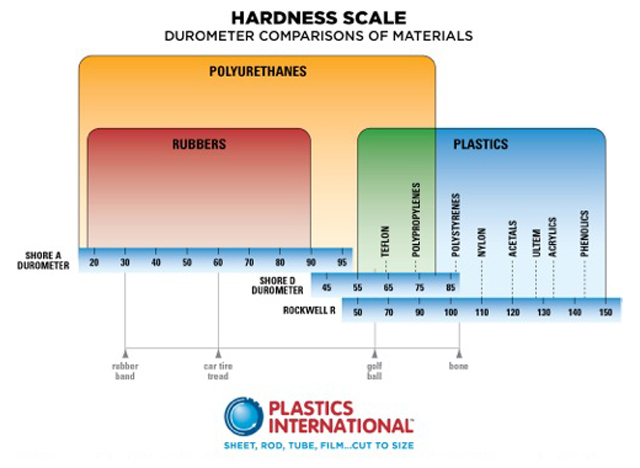
ThermoPlastic Elastomer, i.e Ninja-Flex; 85 Shore D Scale,,
see also WikiPedia)...
...Below is a sample of an object called 'Gear-Bearing'
(avail on ThingVerse #246807), I considered purchasing the
UltiMaker2, so I bought this object from a 3D-Printer Hub
(12$ incl shipping) to gauge the quality of the 2500$
UltiMaker2 against the FlashForge and requested that it be
printed with the Ultra Quality Settings.. check the
UltiMakers Specs & judge for yourself, I don't see
Double the Quality for Double the Price in fact as per the
guy that printed it, it took 4.5hrs.. Mine took just under
3hrs using Simplify3D.. BTW this object was printed with PLA
on both machines... (PolyLactic Acid, Biodegradable
ThermoPlastic, see WikiPedia), the Ultimaker2 used a
Heated Bed with Kapton, the FlashForge has a Heated Bild
Platform also covered with Kapton Tape.. I choose to use
the reg 6'' wide Bild-Tape on my platform, using this tape Heat is not
needed for 'Adhesion' (provided proper setup clearances are
used) mine was unHeated using Bild-Tape as
you can see the diff in textures of the surface in contact
with the bild platforms...
..Gear-Bearing Comparison Images.. |
|
..the
above part is one of the more detailed and complicated parts
I've made, it's dimensions are approx 1.375'' x 1.50'' x
0.375'' (WxLxH), the tolerances are ±0.003'' to the original
part I reverse engineered (as a structural enhancement part
for a UAS).. in the preview images you may have noticed the
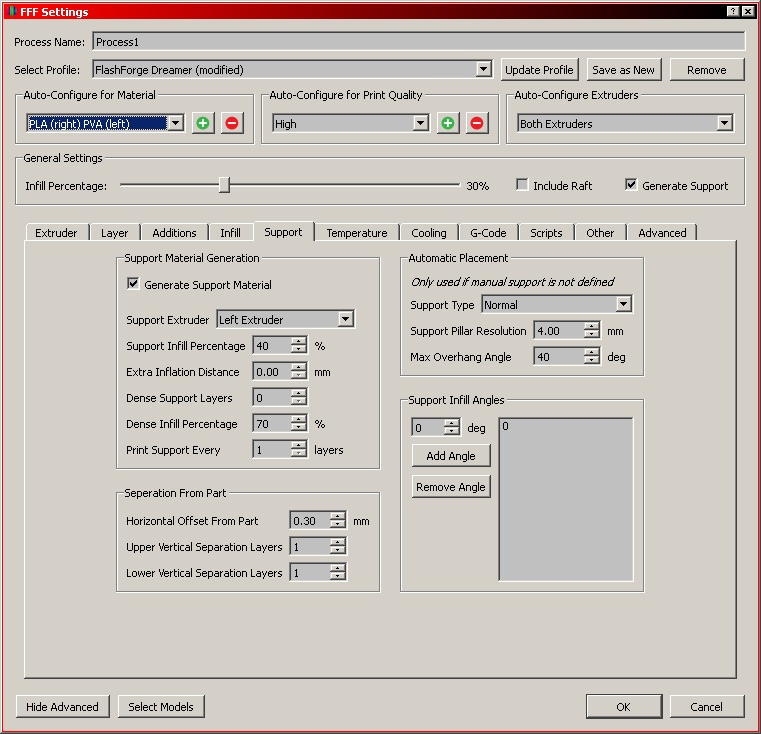
error in the Auto-Generated Support Structure(s), I tweaked
parameters trying to eliminate it, but.., you'll also notice
that the error does not penetrate the structure.. so
spending anymore time trying to eliminate an error that has
no effect on the structural integrity was impractical, and
btw it also did not effect the exterior surface finish, so a
couple of seconds more to flick it off after build, no
biggy.. the most recent update (v3.0.1) is also suppose to
Enhance/Address Auto-Generate Support Structure
Features/Issues, maybe this was one of
them.. I've been working on a Housing for a Mullard XX1332
Image Intensifier that will have integrated PWR Supp w/SWT
and interchangeable Camera & Lens Mounts.. while not as
complicated it is a Large Build i.e. several hours for the
main housing alone.. so, what I do is build smaller proto-type
parts to check for fit and/or function.. working with PLA
depending on the shape of the parts dimensions can vary
slightly.. but enough to matter.. and again that's what
makes a good Slicing Program and it's features so important.. about the
the Parts or Objects, if you're reading this you probably
already know about sites Like 'ThingVerse' where there are
literally 10's of thousands of objects freely downloadable..
but in my opinion that's like having a girlfriend and
letting someone else take her to the movies if you know what
I mean.. |