|
| |
|
|

 |
|
|
<---<
..Click & Drag Image Above or Hover & Rapid
Fire Left Mouse Button.. >---> |
|
|
 |
|
|
|
..by request,
I will start uploading some of my local scenery taken with
the Phantom4.. see btm of page.. |
|
| |
..29Jun2016, just received this P4 and so far have only ran 3
batteries, approx 53min of very cautious flights,
have not tested any of the 'extended features', yet,
but so far there's no doubt in comparison to the
Inspire1 (which is Good) the stability is
Rock-Solid.. the Obstacle Avoidance Sys coupled with
the Vision Positioning Sys takes a lil getting used
to.. for instance, flying over a pitched roof it
tends to actually fly or drift backwards several
feet rather than hover in place.. also there seems
to be an intermittent loss of altitude i.e. dropping
several feet, its not a drastic drop.. but its there
and must be monitored.. the diff in pwr btwn the
Inspire1 and the P4 was to be expected, however, it
is a Big Diff.. and unless I have another issue the
Ctrl's (Rudder Response) seem Mushy, this is
confirmed by the data extracted from the flight-log
thanks to Healthy-Drones (delay's from 0.5sec up to
1.0sec).. also Battery Temp, the Inspire1's battery
bay is basically open, lots of surface area to dump
heat, whereas the Phantoms battery is buried inside
the fuselage.. the battery itself is vented, but I
think the drone or the arms should somehow be ducted
to help with the cooling.. then again maybe
I'm just not used to see'ing Batt Temps >140°F..
obviously I'll keep testing and getting used to the
Phantom but these are my first impressions..
..continued testing
the Phantom to verify whether I had a lemon or not,
at the 5th Battery it flew as if it were a
different Phantom, Rudder response is Now NORMAL,
Quick, Snappy.. so..? Break-In Period? Too Much Lube
on a JoyStick/Encoder..dunno, I was advised by DJI
Cust-Srvc or OnLine-Cut 'n Paste Tech(s) to make adjustments to
the GAIN & EXPO Tuning and to Rely on the App to
Warn me if there were any Temperature Related
Issues, for whatever reason they refuse to
give out a 'Normal Operating Temp Range' for the
'Batteries', but did tell me that if they were
to reach a 'Threshold' >60°C /140°F that I
would be Prompted and that I Should Land, I got No
Warning Indication or Prompt.. so anyway, I Made No,
None, Zero Adjustments to GAIN or EXPO, this
is a brand new craft, IMO it shouldn't need any
adjustments and as far as the battery temp issue, I
attribute the excessive temp (143.5°F) due to my
overly cautious flying the 1st day, And will
continue to monitor the Battery Temp(s) with the Hands-On Approach,
there is No Such Thing as a Software Magic Carpet,
read the NewsGroups, SIG's and Forums, they're loaded
with horror stories of people relying solely on the
Software.. Software is not a substitute for
hands-on experience in this case..
..Do I still have a bad
taste in my mouth with DJI in ref to the Inspire1
and the
lack of Structural Repair Parts and Post-Sale
Cust-Srvc, Absolutely YES, I think its a piss-poor
business model (but then again a Casino is
profitable, and, the customers keep coming back, pay
out just enough warranty claims to keep up the
perception, hmmm), but its one that is becoming more
and more common with such a Dumbed Down Public
unwilling or too lazy to think for themselves.. but
this is not a manifesto, this is about the/my
Phantom4, and DJI has got it right with this one..
having only flown it for approx 18hrs (140hrs now) I gotta say
'it Does Exactly What its Advertised to do, Right
out of the box'.. will there be defects here and
there, of course, its a mass-produced product.. the
Problem for DJI is.. all a competitor has to do now
is copy the Phantom4, give it a Sexier Fuselage and
they'll have a winner.. (hmmm Walkera Scout with
Phantom4 Guts............)
..in-Flight UpDate..
..Update: DJI does it
again, ..and again.. ..05Jul2016, flying my
Phantom during the day, lil more difficult because
the tablet screens are hard to see in bright light..
during my flight, Phantom is approx 2200ft dwn
range, a window pops up on my screen, is it High
Contrast.. phhhftt No, I cant read it, but I still
have ctrl and can see enough of the edges of the
screen to safely fly it back to Home-Point.. get it
into the shade and now I can see the Geo-Fencing
Warning incl the Check-Boxes & Confirm Button..
..and again? ..06Jul2016 while setting up to
fly, my tablet is force fed the DJI-Go v282 Update,
at the time I didn't notice it, there was No Change
in the UI and I don't typically Check Sftwr Versions
pre-Flight (well I didn't then..) what I did notice
was massive Live-Video Artifacts, Pixilation etc..
bad enough that it would block the screen 90% of the
time, so I landed, checked connections ..etc..
attempted 2 more flights.. same thing.. landed
again, checked all settings incl sftwr versions and
found that I'm now running v282..! so I try to fly
again, once motors started, (Audible) '..Home Point
has been UpDated, Check it on the Map..' click the
map, App Crashes, 6x in a row (btw the app did
generate 6ea Crash-Logs & 15ea Flight-Logs! in this
process) ..so that pretty much ended my flying for
the day.. removed 282, reInstalled 281, immediately
Google DwnLd Mgr attempts to reUpDate.. whats
particularly galling about all this is DJI
apparently does No Testing Prior to Distribution of
these Updates not to mention the fact that each of
the Updates are like a Blivit (10lbs of sht in a 5lb
bag), a One-Size Fits All Piece of Sftwr.. I
personally don't think it can be done.. and honestly
don't think it should be done with these
aircraft.. ..oh and included with the v282
Update was a multi-page, fine-print type document
(EULA or Terms of Use, hmm can't find it anywhere)
basically free'ing DJI of any liability.. for
Anything,, and by Running the App or Product you
assume ALL responsibility and/or liability.. this may have been included with
the other updates I don't know.. this is the first
(and last) update that I've inadvertently allowed
shoved dwn my throat..
DJI - Terms of
Use (01Jul2016) - 9 page scrn capped PDF Document approx 11mb
..UpDate: approx
25Jul2016 DJI releases DJI-Go v283 with added
support for the Zenmuse Z3 Camera & Bug Fixes (the Z3 features an
optical zoom lens, It provides a 3.5 optical zoom
and 2x digital zoom), 15Aug2015 figured I'd install
v283 to test and make sure there there wasn't real
issues or nasty bugs I couldn't live with prior to purchasing the
Z3.. Installed v283 and Took-Off, 'IMMEDIATELY'
I noticed a substantial decrease in acceleration
(later confirmed by way of FWD Pitch degree's, prior
18-20°, post 12-15°), I assumed at the time it was
an attempt to address the heat issue, so I continued
to fly it, approx 6ea batteries (27 Flights Now) and
from those few tests it does appear to have
addressed the heat or Over-Heat Issue.. also, the
Altitude Variance Issue seems to have been addressed
at least with my Phantom 4 and I thank DJI for the
effort even though regarding the heat this is only a band-aide the
P4 or the Next Model Actually needs more ducting
to allow it to dissipate the heat generated more
efficiently (if I currently had access to a Mill I'd prove it,
fill a New P4 Shell with amalgam, mill several
strategically placed slots so as not to weaken the
air-frame but allow more air flow in and out of the
fuselage, Why? because Heat is a Cancer to
electronics)., prior to this with
ambient temps ≥80°F unless you continued to move at
speed throughout the entire flight, And, flew it at or
near 20min the battery would reach the DJI stated
threshold of 60°C or 140°F.. so just buzzing around
the yard was pretty much out of the question unless
you flew much less than the full capacity or flight-time
of the battery..
..the Altitude
Variance Issue has been reported by many in the
forums, the Heat on the other hand, I haven't found
or read Any., simmering their props @140°F to Die
them some butt-ugly color or Putting the Entire
Craft Inside the Refrigerator to Calibrate it,
dozens, it's about as ridiculous as smoking banana
peels.. my guess is that the majority rely
solely on the sftwr to alert them of any problems..
there have been some reports of Motor Failure, but
again, the accuracy of is questionable at best, I
believe it far more likely that in those cases it
was ESC Failure due to Excessive Heat from the
Batteries over time,
these motors along with the ctrl sftwr are bullet
proof, short of purposely jamming and then forcing
current I don't think you can burn one up during
normal operation, a seized
bearing on the other hand is possible, but again,
the nfo related to these Motor Failures are
incomplete.. Only problem I've seen so far, that I
believe is related to the Altitude Variance Fix is
that the craft seems more squirrelly in Low-Light
when landing, just be aware of it and fly
cautiously..
..All of this I thought
was Great.. One or actually TWO Less Things to Worry About..
So,
just for grins I decided to remove v283 and
reinstall v281 (v282 seems to have too many bugs
i.e. video artifacts, apps crashes ..etc..)
..installed v281 and to my surprise I Did Not get my
acceleration back.. Now That Smells an Awful lot like a
BackDoor to the Firmware.. Like it or not, Believe
it or not,, DJI wants their Product to be the best,
they don't like people complaining about their
product.. and by installing and running the sftwr or
hrdwr you agree by way of the EULA to allow these
changes.. so again, my advise is if you're craft is
flying well and to your expectations beware of the
UpDates and take measures to allow or deny The
UpDates and their
changes, bottom line.. you paid for it.. Oh! Almost
forgot, the
misspelled 'Spalsh' directory is still there hhaha..
(constantly Updating the Advertisement Nag Screen,
via the PUSH srvc)..
DJI-Go v2.8.4
(source APK-Pure)
|
Version: 2.8.4 (62)
for Android 4.1+
Update on:
Aug 22 2016
What's new:
- Added
support for DJI Focus Handwheel.
- Added support for Facebook Live and
RTMP live streaming.
- Added support for Coach Mode in DJI
Lightbridge 2.
- Fixed the problem that iOS DJI Flight
Records cannot be synced.
|
Version: 2.8.4 (63)
for Android 4.1+
Update
on: Aug 26 2016
What's
new: (everything is the same, except
for the build # ???)
- Added
support for DJI Focus Handwheel.
- Added support for Facebook Live
and RTMP live streaming.
- Added support for Coach Mode in
DJI Lightbridge 2.
- Fixed the problem that iOS DJI
Flight Records cannot be synced.
|
..Just in case it was
missed in my rambling I want to say, I think the DJI
Phantom 4 is the absolute Best of this generation
drone currently on the market, and is most probable
the drone (ctrl & reliability) the other mfg are
trying to replicate.. its the Company and their
practices that really sux..
..I thought I'd
noticed more Signal Issues with DJI-Go v283 (using
the GL300C) even though its difficult to tell while
flying in town, the 2.4GHz band is so crowded, so on
Sun.21Aug2016 I drove out to a place I'd been
eye-balling on Google-Earth for some time.. No
AirSpace Issues, Little or No Interference Issues, Plenty of Range to test and No Population to
worry about.. the only issue, if it were to go down,
it would be a nightmare or next to impossible to
recover.., the Max Distance flown during this test was 11,125ft or 2.1mi,
Take-Off Batt was @97%, after all Pre-Flight Checks
Batt was @91% beginning the trek, it was obvious
through-out the flight I had cross-winds.. I Landed
with 21-22% Batt Remaining (11-12% actual useable
Batt, mine shuts OFF @10%).. images heading out were
pretty much into the sun, coming back images a lil
better.. toward the bottom of this page are some of
the images and video taken during that test-flight..
|
|
| |
..UpDate Ultimatum..
..Update:
welp.. DJi is at it again, 08Feb2017
(possibly sooner, this is when I found it) hadn't
flown my Inspire in months due to battery issues and
because I've been busy with the Phantom.. went out
to fly and the App crashed while I was approx 180ft
AGL and approx 1000ft dwn range, I was able to land
safely.. I then attempted to fly another battery
only to find DJI's Ultimatum.. UpDate or you can't
use the App.. after several attempts was able to get
the app to conn to the craft but was then unable to
update the map.. few days later another flyer found
a workaround to this ultimatum, but what was really
telling about it was that once the workaround had
been applied you were then presented with an option
'Remind Me Later' so what this tells me is that
someone at DJi had decided !#$%^$ the Customers
either they UpDate or they don't fly and argument
could be made that the choice isn't whether you Fly
or Not but whether you fly Safely because you could
fly it just without a map.. I suppose the argument
could then be made 'if you fly within the line of
sight, you don't need a map' I disagree.. days later
while flying my Phantom I noticed massive signal
errors in an area that I've flown well over 60hrs..
I looked down at the map screen and I had flown off
the map.. turned around, got back on the map and the
signal issues cleared up, why? how? I don't know,
this is what I observed, after landing I attempted
to update the map via WiFi conn and it was then that
my phantom (Ctrl-Sta, I use a separate tablet for
each craft) was now infected with the Update
Ultimatum Malware.. in my opinion its just another
example of the sheer arrogance of DJi.. why another
mfg doesn't take advantage of this is beyond me..
and BTW I've been flying DJi-Go v283 and aside from
the obstacle avoidance issue, relatively problem
free for >60hrs at this location, in addition to that I've been
using the Original Firmware (v0101-0301) that was
installed on the craft upon receipt, Jun2016..
|
|
| |
 |
|
|
|
..(above) this is a partial OverView of my Flights to
Date on
my Phantom4-01, Very rarely do I Land with <1.5min
remaining battery power, more typically I land with
approx 2min remaining With My Inspire1,
however with the Phantom or more correctly the
DJI-GO App (vs DJI-Pilot I use with the Inspire)
the Minutes Displayed on the Battery Level Indicator
does not seem to Correlate well with the Actual
Battery Percentage Remaining, this may be yet
another intermittent issue or Bug, but I've been focused on
the other issues (Primarily the Battery Over-Heat
Issue) and will look into this issue more closely
later.. that's certainly not to say that DJI will
have a solution or even acknowledge any issue found,
But, at least I will know more about the machine I'm
operating.. This data is extracted from the
Flight-Log(s) and is then Complied by Healthy-Drones
(now called Air-Data)..
..(below)
this is my equipment log for my
Phantom4-01, All Data Generated including FlightLogs
& Imaging are Backed Up to WD Ultra-Passport HD's &
BD-R DL Disks.. |
|
| |
 |
 |
|
|
| |
 |
|
| |
..in
the data above, Column, 'Internals Temp (ESC STBD)',
I'm only guessing that the PC Board visible is the
ESC, I don't know that for a fact.. (a decent manual
would be nice) |
|
| |
..I
notified DJI of the Battery Temp Issue after my
first flight, I then collected the data above as per
Specific Request by DJI (i.e. use 'Hand-Held Temp
Probe') and after getting back in contact
with them and giving them access to the data they 1) didn't
bother to look at it and 2) continued to tell me that
there isn't a problem.. and this is after DJI told
me that the Battery Operating Threshold is 60°C
(140°F) ..I have initiated a Return/Replacement of
this Battery.. the data clearly shows 1) its getting
worse over time, 2) to keep within the DJI Specified
Temperature Threshold
I will continue to loose flight time, each flight..
the advertised Flight Time of the Phantom 4 is
28min, like MPG your mileage will vary.. hahha..
typical maximum flight-times, as you can see
from the Healthy-Drones extracted data from over 2,000,000 Individual Flight-Logs is approx 20-22min..
UpDate:
30Jul2016, Received Replacement
PH4-5350mAh-15.2V Battery from Vendor, 2wks from the
day I sent the initial email, could've been a lil
faster but all in all not too bad..
after explaining this issue, and the steps I took to
get it the issue resolved (i.e. Defective Batt
Replaced) to the other Customers, I was Banned
from DJI's forum, that ban is Still in place
>6months later..
UpDate:
May-Jun2017 Now each of my Batts have approx
120charges, and I notice that the op temp is
starting to rise even with ambient temps <80°F..
seems that as the batt age the internal
resistance increases thereby generating more heat ..
Aug2017
Batt#03, 132charges, ambient temp approx 93°F
(33°C), op temp 150.7°F (65.9°C) with an 18min
flight time.. Sept2017, Batt#01,
137charges, ambient temp approx 68°F (20°C), op temp
132.4°F (55.7°C) with 17min flight time..
|
|
..Remote Ctrl Battery..
..I bought the P4 with 2
extra batteries, not long after I purchased a spare Rem Ctrl in case of
catastrophic failure of the remote, loss or breakage.. my best guess is that at
approx 100charges on the rem ctrl the battery started loosing capacity and it
went down hill quick.. in the beginning a single flight would use approx 5-7% of
the remote ctrl batt capacity.. that then increased to 8-10%.. then 10-15%..
then as much as 25%.. I treated this battery like I've treated all my
rechargeable batteries, but I thought for whatever reason this one has failed
prematurely.. I then found out there isn't a direct replacement and that DJi
recommends purchasing a New Remote Control..! WTF!?!.. well by this time I owned
a total of 5 remote ctrl's between the Inspires and the Phantom.. Figured I'll
swap out one of the batteries and be back up running in no time.. Wrong..
I started swapping out the batteries and found that 'This' remote control would
not charge 'Any' of the other batteries greater than 50%, then 20%, then 2% and
finally 1%.. I then took that same battery, installed it into the new spare rem
ctrl and as if by fMagic it charged to 100% ..as it turns out, the Remote
Ctrl itself has a limited charge capacity or a limited number of times that it
will charge its battery to 100%.. at the risk of sounding like whatever I'll
just say that I am intimately familiar with manufacturing and designed
obsolescence, but this has got to be an all time fLow.. 185$ 7.4Vdc 6000mAh 2S1P
Battery Replacement.. I then calculated the total cost of owning and operating
this P4 and this point in time to be 15$/hr, ..if I add up all DJi products
including spare parts that number goes up to 61$/hr.. Below you'll see my
Antenna and RF Booster Mod, my original design included a battery slung up
underneath.. but wanting to keep the overall foot-print and weight to a minimum
I changed it.. now with this rem ctrl batt charging issue in mind I've decided
to revisit that design, to basically increase (double) the overall capacity
which will thereby decrease the number of charges required from the rem ctrl..
|
| |
..Dropped Connection & RTH..
..04Sept2016,
flying down at the harbor interference is
intermittent, sometimes I fly there and have Zero
Issues, on two occasions I've actually
Dropped-Connection with the craft due to
interference (and only Once has the craft actually
initiated a RTH and that was while testing Chl20), on 04Sept2016 while flying I first
noticed the interference with the Video DwnLink, it
became Choppy and had excessive artifacts so I watched the Signal Indicators in
DJI-Go Very Closely, the RemCtrl Indicator Remained
@100% (the idiotic 'Bars' remained Full) while the
HD or Video Signal Indicator was intermittent, But
never dropped below 2 Bars.. so I
continued to fly, made a fly-by and the signal seemed to clear up.. so I took it out
to approx 4500ft at approx 300ft/agl in a diff
direction, made my turn
towards Home-Point, could in fact see Home-Point and
within a few hundred feet complete loss of signal,
Grey-Screen, RED Indicator on the RC and the DJI-Go
App just locked up in that state.. I purposely
set Home-Point and Verify RTH Settings (Altitude &
Function) everytime I
take-off whether I get the (Auto Set) Audible
Notification (also intermittent) or Not.. so I waited for it to fly itself back
home.. I know now I waited too long, by approx
90sec, nevertheless that's what I did.. still
nothing, so I shut-dwn the DJI-Go App and reStarted
it.. it immediately reConnected and Set what I now
call the 'Auto-Set Home-Point' (my Batt was @26% at
this point) ..the Auto-Set Home-Point with my
Phantom4 running DJI-Go v283 is ALWAYS the AirCrafts
Current Position, which in this case or at this
point was approx
3000ft dwn range (btw the last 1000ft of that 3000ft
is a body of water)..
..The 'Auto-Set Home-Point'
again is ALWAYS set at the AirCrafts Current
Position, when: 1) The Motors are Started, or 2)
When DJI-Go ReConnects to a Currently Running
Craft.. so, what I can assume from this situation
is, the interference was so bad that it caused a
Dropped-Connection with the RC/Ctrl-Sta and was Bad
Enough to wigg-out the compass, that's the reason it
didn't RTH and instead just hovered in place.. All
Good, I don't think so.. I think the Craft should be
smart enough to remember the Home-Point Set at the
Start of the Flight.. it can remember, Video
Settings, it can remember RTH Altitude and it can
Remember these things even if you UnInstall the App
and ReInstall and Diff version.. so these things are
remembered or 'Stored' on the Craft itself..
Obviously it has to have a properly functioning
Compass to return (RTH) to the Stored Location..
..So my procedure from now on is this, If I drop
Connection with the Craft, I'll wait no more than
30sec for it to re-conn before I Shut-Dwn & reStart the App, once the
App has reStarted and I've Verified Connection and
Ctrl the next thing I'll do is Set the RC/Ctrl-Sta
as Home-Point and proceed to fly back, at this point
all you can do is hope everything works as it
should.. if it were to drop connection again and I
cannot reConn to it, it should
return to Me (the RC/Ctrl-Sta) rather than turn
around and go back to the New Home-Point that was
set upon reConn.. ..images of the flight path and
some of the data of this flight are just below this
column.. (Click to Enlarge)
..the next day I took it to a land-locked location
to do some testing and verified 'Auto-Set
Home-Point' is Always Set as the
'AirCrafts Current Position' 1) Once the Software
has initialized and/or Motors are
Started, or, 2) Once DJI-Go RE-CONNECTS to an
already running AirCraft.. and this is the same for
DJI-Go v281 and v283, I Did Not test v282 because it
seems to be toooo Buggy.. as far as I know this
could just be the nature of the beast.. But I can
confirm that this characteristic is No Where in the
Manual.. Also, with my P4 once RTH has been
initiated the Craft ascends to 1/2 the RTH Preset
Altitude, it then Adj's Heading, ascends to the
Preset Altitude and Returns to the Home-Point in
Sport-Mode.. so be aware of it because once it
reaches Home-Point it will come Down Very Fast..
ALSO Not in the Manual..
..IF on the other hand you'd rather set the
RC/Ctrl-Sta as the Home-Point you can
only set it AFTER the Motors have Started (also not in the
Manual), remember IF the Ctrl's and the Craft are
operating normally, then, the Home-Point will be
reset to the AirCrafts current position Once the
Motors Start, Sftwr Init or ReConn to am already
running aircraft.. 'IF' it doesn't and/or is
Intermittent, Un-Install the App, PWR-OFF the
Device, wait 30sec, PWR-ON and Re-Install the App, I
suggest the site APK-Pure (
https://apkpure.com/dji-go/dji.pilot
) , they usually keep the last 10 versions of
DJI-Go, DwnLd your version and keep a copy of it on
your device.. if the App seems to be acting up or
you see some strange anomalies Dump it and
re-Install, it only takes a coupla minutes to rule it
out..
|
|
| |
..Signal Issues incl Flight Path(s).. |
|
| |
 |
|
| |
..the graphic above depicts the Flight-Path included
with the Signal Errors, Grn being little to no
errors thru Org, Red & Pur being the worse signal
error.. obviously there's more to it than just the
errors themselves because during this flight the
signal errors were GRN (little to none) when the
lights went out, the other problem is, this
graphical data doesn't differentiate between the
Video DwnLink Signal and the Ctrl Signal, also
Important and Not Displayed is the Interference to
the Compass, why the Ctrl-Sta (DJI-Go App) just fell
on its face in this situation is a question for DJI,
and knowing DJI that's a question that'll never get
answered.. (BTW the RED Path, is approx 560ft that
the P4 Coasted to a Stop or the time / distance
traveled before the Phantom finally decided it
couldn't find its way back home, gave up then just
hovered in place.. i.e. Last-Known to ReConn
Location) (Click to Enlarge Anim-GIF)..
|
|
|
..Antenna Testing & Mod..
..After the dropped signal issue described above I decided to do
the 'Antenna Mod' it was then that I found the
performance of the antenna's on the market were less
than desirable and far from reliable, so I decided
to do the research and design my own..
..On EBay,
Amazon, BangGood or Other Drone/UAV WebSites you can
find antenna deals from just 99¢ to 88+$ each, I've
purchased hand fulls of of the cheaper antennas
prior to buying the test equip and basically used a
trial and error approach to finding a half-decent
antenna(s) and believe it or not the 20$ antenna(s)
do not perform 20x, or even 2x better than the 99¢
or as it turns out than the 88$ antennas, and in
some cases barely any better at all.. they're simply not
well tuned to the applicable frequencies and BTW
ridiculously high Gain is no substitute for a well
tuned, impedance matched antenna.. I bought an antenna
set on EBay, 20$, very popular in fact and at first
glance I had high hopes, nice lil patch antenna..
but at any distance the performance just fell
off and it seemed to pick up interference as if it
were a coat-hanger wrapped in tin-foil or a mosquito net, everything flying it caught..
it came with cables and a small screw-driver, also
the RP-SMA Conn on the antenna was of very poor quality.. the Gain
is listed as 2.4-2.6G hhaha and so is the
frequency..! I actually bought them for the
'Mod-Cables with 90° Connections' the 2nd set I
bought they had re-designed the innards which did
help, the original was tuned at approx 2360MHz (v2
approx 2490MHz)..
when I emailed them they told me '..you need to
install the DJI-Go Patch..' the patch referred to is
the 'Channel Patch', as I remember added chl21-chl32
which would push it even further from their 2360MHz
tuning
and in fact would push it into the 2500MHz 'Licensed
Band', precisely the reason I believe that
particular Mod dried up.. So, you've made the
antenna mod,
now you need a decent antenna.. short of purchasing
the equip & designing and/or tuning one yourself, go to EBay and
buy a hand-full of cheap antennas take your drone to an area of known high
interference and test it, I suggest your testing is
not done over moving traffic or people, the safest
(from a personal injury stand-point) I
think is over water.. get a free acct on
Healthy-Drones and document your results.. (caveat:
..signal errors on HD is Not the whole story,
actually far from it, but it is better than
nothing.. for example, I've flown and gotten the RED
Indicator "Weak Tx Signal' but the Signal Errors on
HD showed no issues, other times I've had what I
thought was a perfect flight No signal issues what
so ever but yet HD signal errors were thru the
roof.. I do not mean to berate the HD service, it is
currently the best out there, but the algorithms
used are not flawless)..
..as it turns out RF technology is Very
Interesting, but, Testing can get Very Expensive..
to date I'm Tuning my current antenna design and
again to date, my antenna is Magnitudes more
resonate at the applicable frequency band used by
the Phantom(x) and Inspire(x) than is the typical
antenna avail on the market, that includes the
antenna(s) supposedly designed for those drones.. as
they say.. proof is in the pudding, data & specs
forthcoming.. Not only is my antenna better tuned
but has a VSWR of approx 1.03-1.20:1, (in fact
at least 1 variation of my design has a VSWR of
1.01 which is ≥-46.064dB mine is -49.5dB, 1.0:1 is
Ideal.. to date I've tested over 420ea variations)
typically the antennas sold online don't offer any
performance specs, most usually only give the Gain..
but when they do their VSWR is usually listed as
≤2.0 and BTW some of the absolute worst
antenna I've purchased & tested still have a ≤2.0:1
VSWR.. Others do give a Horz & Vert graphic
depiction of the simulated radiation patterns, which
gives you some idea of the Gain and/or Beam-Widths
(Gain is a relative measure of the antennas
Directivity, usually expressed as dBi.. dB relative
to a theoretical Isotropic Radiator) depending on the Type of antenna,
which is good nfo, however I think the more
important spec is the Band-Width and of course the
VSWR..
..Very
Basically the VSWR (viz-war) property of an antenna
is the ratio of the antennas ability to radiate the
source energy vs having that energy reflected back
to the source, obviously the better (lower ratio)
the greater its ability to transmit/radiate the source
energy and is an indication of its tuning or
resonance.. if you Tx/Rx at say btwn 2410-2420MHz
and your antenna is a so called Wide-Band thats
sloppily tuned with a huge 100MHz dip or Bow across
the entire 2400-2500MHz band, then yes,
that antenna will Tx/Rx your 2410-2420MHz signal,
however, it will also pick up alot of unnecessary
frequencies which in this case or for our purposes
amounts to Interference, and again will typically be
very inefficient, ..since the whole reason
for an antenna is to transmit and/or receive signal,
the VSWR could also be considered a quantitative
measure of its efficiency i.e. VSWR of 1.15:1 = 99.5%.. also if due to its
inefficiency (poor impedance matching) the reflected
energy or the power is high enough it could damage
the transmitter..
simply adding amps/boosters is ridiculous and actually
unsafe, harmful, yeah you might be able to push
enough energy thru a poor antenna to get 4mi range,
but is it worth getting Cataracts..? or putting your
brain in DeFrost Mode..? I am not an RF
Engineer, and one could probably pick apart my very
basic description here (impedance matching,
reflection coefficient yada yada)..
..Some sources
of interference are obvious and you can usually see
the effects of it at the Ctrl-Sta.. it may present with choppy
video (more correctly Pixelated Video, Choppy could
also be indication of poor tablet performance) or Pink/Purple
Banding.. On my ctrl I've found that using channels
above Chl15 were highly susceptible to EMF from
High-Voltage Panels & Under-Ground wiring and if the
area has high galvanic corrosion and the ground was
wet the interference went thru the roof.. and BTW
that includes interference to the Compass i.e. Pink/Purple Banding,
Compass Interference av >100 (at the harbor, near
the docks).. in my testing with
both the Inspire & Phantom I've found that Chl14 was
in general the best or most clear of interference from EMF and random WiFi or more correctly
random 2400-2500MHz signal/energy, we're literally
bathed in it, for instance most of the Microwave
Ovens I've tested operate at approx 2440-2460Mhz
(approx chl17-18) and
emit a surprising high amount of energy in
comparison to the drone ctrl.. and yet another
source of interference are Obstructions, when you
think of an obstruction you think of the signal
actually being blocked, but thats not the whole
story, obstructions also create interference when
they are within the 'Fresnel Zone' (see
https://en.wikipedia.org/wiki/Fresnel_zone
(see also Multi-Path Propagation and/or
Interference).. in ref to the ctrl or the Receiver itself, most
of these circuits are designed to filter out
frequencies that aren't used so as not to overwhelm
the circuit, but if you've flown either of these
drones for any period of time you'll know that more
filtering so to speak is needed, the 2.4GHz band
is just too crowded and the ctrl seems very
sensitive to interference, and with this interference
we're not talking about a drop in xfer rate, lost
packets or an occasional corrupted file (not to
diminish the importance of good Video DwnLink) but
the real possibility of loosing the drone..
|
UHF Ultra high
frequency – TV broadcasts, microwave ovens,
mobile phones, wireless LAN, Bluetooth, GPS,
and Two-Way Radios
|
|
2400.0 |
2417.0 |
This band is
used in the Amateur Radio Service. Operation
of unlicensed Part 15 Devices is permitted
between 2400 and 2417 MHz. |
|
2417.0 |
2450.0 |
This band is
used in the Amateur Radio Service. This band
is allocated for both Federal and
Non-Federal use. Operation of unlicensed
Part 15 Devices is permitted between 2417
and 2450 MHz. |
|
2450.0 |
2483.5 |
This band is
used in the Fixed Microwave Service, the
Industrial, Scientific and Medical Equipment
Service (ISM), the Local Television
Transmission Service, the Radiolocation
Service, the Public Safety Radio Service,
and the TV Broadcast Auxiliary Service.
Operation of unlicensed Part 15 Devices is
permitted between 2450 and 2483.5 MHz.
(FCC) |
..Another
problem with our ctrl is ESD
(Electro-Static Discharge) touch the antennas while
operating the drone as little as possible, ..on a Mod'd Ctrl the Chrome
Scussion or Trim at
the base of the antenna is a direct circuit to
ground, unless of course you've taken measures to
isolate or remove it, keep this in mind while operating your
craft.. a few other things to keep in mind with a
modified ctrl 1) never Power up the ctrl without an
antenna or load attached 2) terminate the
connections with a 50Ω terminator, the
Receiver,
while facing the ctrl in the operating position is the
Right-Hand Connection, it will always pickup signals
even in the OFF position.. so either keep a
load/antenna attached or terminate it 3) SMA
connections are relatively fragile, particularly the SMA-Female or RP-SMA Male, repeated conn cycles will
wear and/or damage the conn, best practice is to use a sacrificial
connector, the typical Quality SMA type connector
has a Loss
of approx 0.3dB (each), caveat, you get what you pay
for in this world, keep that in mind when purchasing
your connections, terminators or cable.. (50Ω,
6GHz, SMA Terminator, Good Price @Amazon--->
http://tinyurl.com/jxg9krs )
Remote
Control(s) RF Power (Listed as EIRP in Specs)
|
- GL658A
(Inspire1): Dual-Band 2.4 / 5.8GHz 20 / 13dBm (FCC), Not Listed (CE)
- GL6D10A (Inspire2): Dual-Band 2.4 / 5.8GHz 26 / 28dBm (FCC), 17 / 14dBm (CE)
- GL300C (Phantom4): 2.400-2.483GHz 23dBm (FCC), 17dBm (CE)
- GL300E/F (Phantom4pro): Dual-Band 2.4 / 5.8GHz 26 / 28dBm (FCC), 17 / 14dBm (CE)
|
|
..Note: EIRP:
Equivalent
Isotropically Radiated Power, is a relative measurement of
output power based on a theoretical single point
source radiator.. the formula is P-L+G
(TxPwr - CableLosses (incl conn's) + AntennaGain =
EIRP)..
|
Remote Control(s) RF
Power Ratings as per FCC Compliance Application(s)
(Listed as Conducted PWR)
|
- GL658A
(Inspire1): SS3-GL6581410
- 2.4GHz 370mW
- GL6D10A (Inspire2):
SS3-GL6D10A1609 - 2.4 / 5.8GHz
834 / 566mW / 240 / 145mW
- GL300C (Phantom4): SS3-GL3001510
- 2.4GHz 303mW
- GL300E/F (Phantom4pro):
SS3-GL300E1609 / SS3-GL300F1609
-
2.4 / 5.8GHz 112 / 693mW /
175mW
|
|
..Note:
Output Power Listed as Conducted: Conducted Output
Power is defined as the total transmit power
delivered to all antennas and antenna elements
averaged across all symbols in the signaling
alphabet when the transmitter is operating at its
maximum power control level (FCC §15.247(b) (3))..
|
Aircraft RF Power Ratings
|
-
Inspire1: SS3-WM6101410
-
Incomplete
-
Inspire1-v2: SS3-WM6101510
-
Incomplete
- Inspire2:
SS3-T650A1609
-
Incomplete
- Phantom4: 2AHAY-WM3301601
-
Incomplete
- Phantom4pro:
SS3-WM331A1609
-
Incomplete
|
..The purpose
of my Antenna design is not just to give range because after
all the stock remote with stock antenna's can take
the Phantom or Inspire further than the battery can
bring you back in an 'Unobstructed and Interference
Free' area, the purpose of my design is to Radiate
(Tx) (and Receive, Rx) as much of the Signal
Energy as is Available, within the Applicable Freq Band,
To the Drone, when operating in High-Interference
Areas i.e. Near Towers, for High-Tension Line
Inspections or over Heavily WiFi Congested
Areas etc..
..Below are a
few of screen shots, I won't give too much
information at this time,
primarily because I may offer my antenna for sale at
some point (recoup some of my costs for the testing
equip) and because I'm still in the Tuning/Testing
Stage.. but
Stay 'Tuned'..
|
|

..this is the
Return-Loss data of my proto-type, as you can see it
is very much resonate at almost dead-center of chl14,
This is what you want, this is an example of Properly Tuned, Impedance Matched
Antenna, this
Antenna will Transmit & Receive 100% of the Avail
PWR, This
Antenna will shine as bright as the Star Sirius
through a fog of WiFi Interference.. |

|
 |
 |
 |
|
..this particular system is equipped with Sunhans
SHRC24G3WP Signal Boosters, with hard connections,
in an inline configuration.. no excess wires or
connections.. the connections from the booster
housing are the more durable, or less fragile RP-SMA
Female making the external connections between (the
Rem-Ctrl and Antenna) sacrificial.. the signal
booster properties are as follows: Output PWR 35dBm,
Transmit Gain 15-18dBm, Receive Gain ≤12dBm, PWR
Supply is a removable 7.4vDc 2500mAh Battery with a
25C rating.. with a current load of ≤600mAh that
gives this system several hours of operation btwn
charges while still holding the overall foot-print
and weight to a minimum, the weight added is only
17.5oz with the Battery & Antenna installed.. the device
itself can be installed, removed and/or
dis-assembled in 2min or less,
and with a lil practice as quickly as 30sec.. it was
produced using PLA on a 3D-Printer again making it plenty durable and light, total print time
for the 4ea parts is approx 12hrs.. in this
current version it has a 3digit LED battery voltage
indicator, the next version will include a
battery capacity indicator that can be upgraded by
simply removing and snapping into place the new battery compartment lid..
Anyone interested in purchasing this system in
Kit-Form or as a Complete System (i.e. Amps,
Connections, Battery, Antenna ..etc) can contact me
via the Inspire/Phantom Pilots Forum or via email
SAS (at) GasRecovery (dot) net ..and BTW once
the new battery indicators come in I'll ship that to
you as a free upgrade.. also please specify Trim
Accent Color Options (incl LED indicator) i.e. Red,
Green, Blue, Yellow, Silver, Black
or All White (PETG vs PLA also avail).. your Logo or Insignia can be added
but must be provided in SVG format.. |
|
|
|
| |
..Return Loss examples of typical antenna sold
online.. |
|
 |
 |
 |
 |
 |
 |
|
..these are the
Return Loss data from a sampling of antennas I have
tested, they are not the worse picks, they were
picked at random.. if I were to give the Mfg name of
these you would undoubtedly recognize them,
I'm providing them here as a FYI, when you decide to
send your 1500-2000+$ drone a couple hundred feet
AGL a good (communication link) antenna is
very important.. think of them like this: the few
that are sloppily tuned within the 2400MHz band are
out of focus or out of Tune (Focus is more related
to the Gain property of the antenna), the others are
more in Tune to
frequencies that are not applicable for the Phantom
or Inspire Drones.. (BTW #01, the best of the 6, is
the 99¢ Rubber-Duck 5dBi antenna and in fact last
time I looked they were down to 89¢/ea problem is,
this was the best of 10ea that I bought).. |
|
 |

..the images above
are the spectrum analysis of the Phantom4 & Inspire1
craft(s) using their respective rem-crtl's.. RED in the UPR
Graph is random WiFi Interference at the time of
testing, BTW testing was done in the same
environment, minutes apart for both craft, colors in
LWR Graph basically depict levels of signal
amplitude over time, the length is just the time it
took to chg channels (Chl13-20), wanted to get them all on one
graph..
|
|
|
|
..P4
Prop & Prop-Lock Wear Indicators
(DJI
CP.PT.000360 Phantom4 9450S Quik Release propellers) |
 |
 |
|
 |
 |
| |
..at approx 40hrs flight-time I started noticing
indications of wear on the bottom of the props, the
wear is actually the rubbing or marring of the
plastic by the tension spring, and is caused by wear
of the prop lock allowing the prop to cycle back and
forth against the tension spring, obviously the
marring itself isn't an issue however the slop or
clearance btwn the prop-lock and the prop is.. the
more clearance or slop the greater the chance for
shear.. I swapped out the props and the prop-locks
and took some measurements.. the dimension of the
locking tab on the New Prop-Lock was approx 0.147''
(3.75mm) and on the 45hr Used Prop-Locks was approx
0.140'' to 0.143'' (3.57-3.60mm), I was unable to
get an accurate measurement of the internals of the
prop itself.. they do in fact fit snuggly on the new
prop-locks however the fatigue of those internals is
the other variable that should not be forgotten.. the risk vs cost of the
props.. I replaced them.. also worth mentioning is I
fly my P4 as safe as possible, I make No Abrupt
Changes in Heading or Speed, if you do fly like
this, you may very well see these wear indications
much sooner.. I have recently flown in rather Gusty
Wind Conditions causing the craft to make abrupt
changes to compensate which will also increase the
wear to the Props & Prop-Locks, just another
variable to keep in mind.. Now on my 2nd Set of
Props approaching the 40hr mark I began to notice a
'Knocking' when I started the motors, it was subtle,
but unmistakable.. Again rather than risk the craft
I replaced the props and locks, this time found very
apparent wear to the prop locks, see fig#04.. |
|
| |
|
|
|
..P4
LWR Shell-Fuselage Crack |
 |
 |
 |
 |
| |
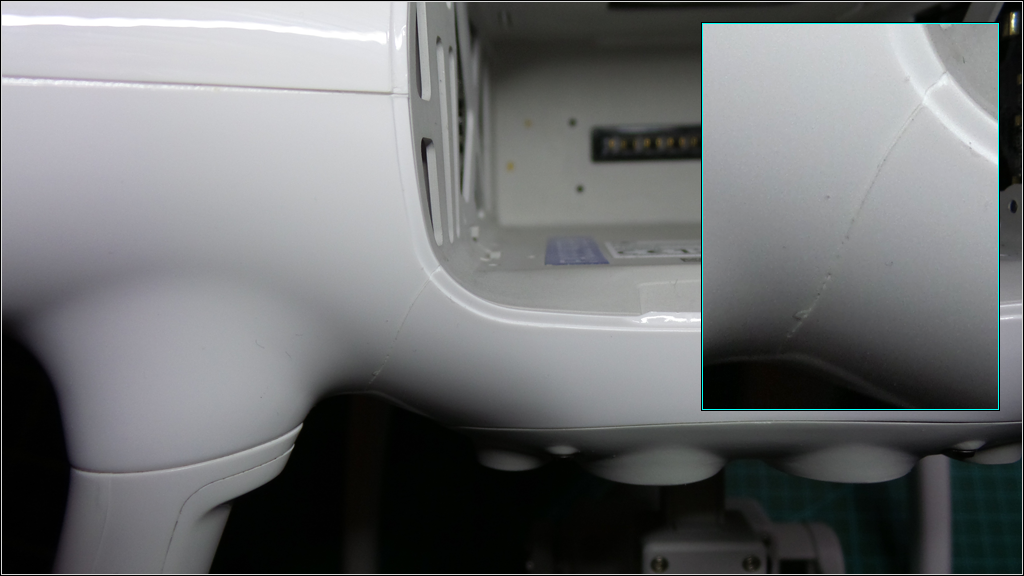
..Rec'vd this P4 29Jun2016, at
flight# 362 approx
106.5hrs, I found a Crack
(fig#01) emanating from
the battery bay opening towards the Left-Rear
Landing Skid.. I've NEVER Crashed this craft, never
so much as a hard landing, I use a landing pad and
land within ±1.0'' of my takeoff point 99.9% of the
time (I've got 362 flight-logs incl the HiRES &
LoRES videos to prove it), I do not carry, lift or
move this craft via the landing skids or the struts,
and I do not slam the battery into place..
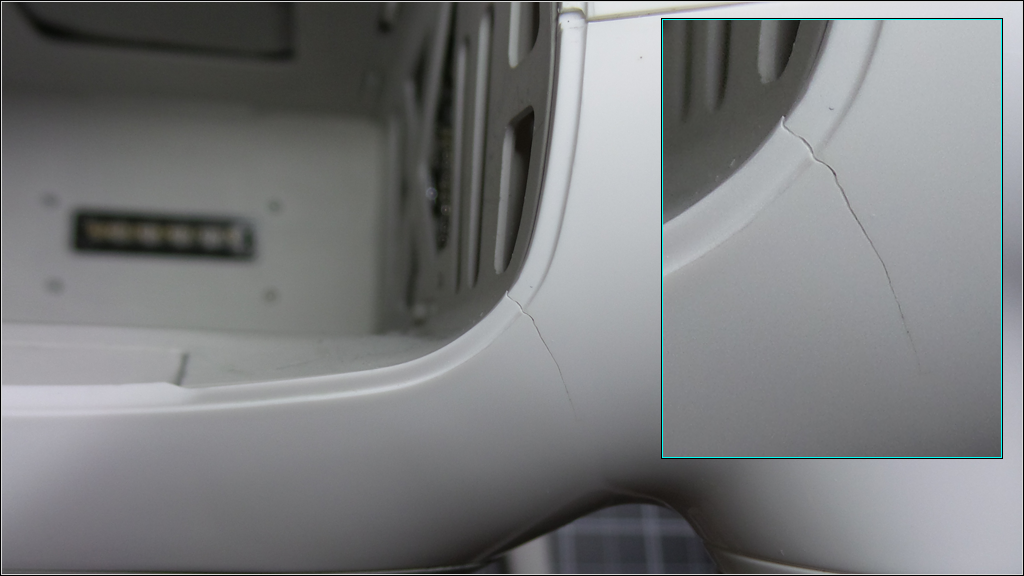
11Mar2017, at flight#390
approx 115.5hrs, I
found Another Crack (fig#2 &
4) on the right side, emanating from the
battery bay in almost the exact same spot as the
left side.. I now believe this
to be a weakness in the structural design rather
than a defect in the plastic.. I would have thought the
Craft would out live the Batteries (without having
to patch it up like Frankenstein that is, even
though all 3 batteries have heat cracks at the
charge indicators and on the side at the die marks).. Fig#03
is an area of concern, it has not yet developed into
a crack and may in fact just be a die mark, but I
will keep a close eye on it.. |
|
| |
|
|
|
|
| |
|
| |
|
| |
|
|
|